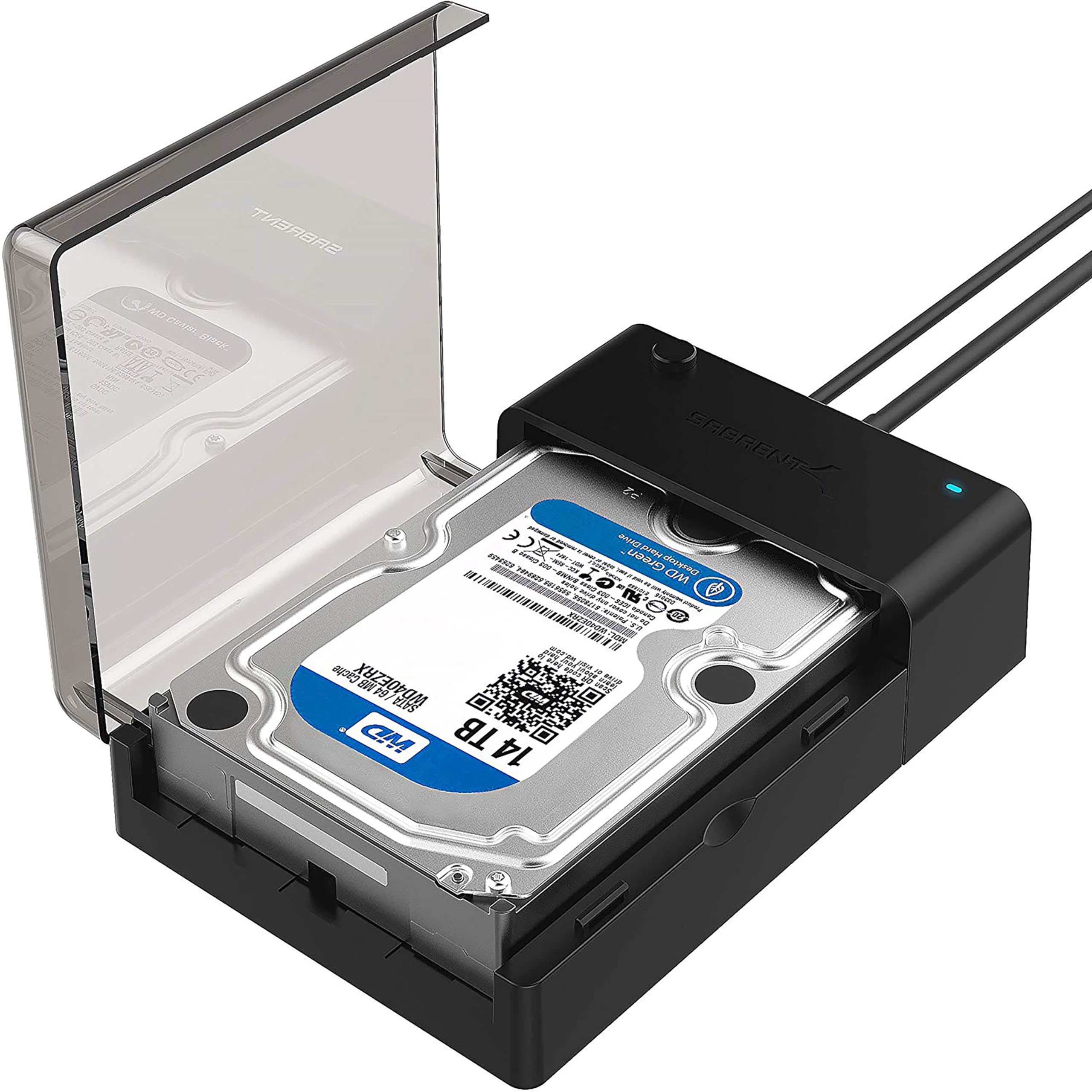
This sabrent hard drive docking station review looks at the EC-DFLT, a lay-flat USB 3.0 dock for working with 2.5- and 3.5-inch SATA hard drives or SSDs.
Its appeal is direct access without installing a drive in an enclosure, with a separate power adapter required for 3.5-inch drives.
SABRENT EC-DFLT Review Summary
The quick verdict
37,000+ ratings
Read Amazon ReviewsSABRENT EC-DFLT SATA Docking Station
A straightforward choice for accessing 2.5- or 3.5-inch SATA drives over USB 3.0, provided you have the right port and power setup.
- Supports 2.5- and 3.5-inch SATA I, SATA II, and SATA III hard drives and SSDs.
- Connects to a computer through USB 3.0 with an included USB Type-A host cable.
- UASP support is available when the host system also supports UASP.
- Plug-and-play use is listed for Windows 10/11, macOS, and Linux; no drivers are required.

Pros
- Works with both 2.5- and 3.5-inch SATA drives, including HDDs and SSDs.
- A direct dock design gives access to a drive without fitting it inside an external enclosure.
Consider before buying
- It is limited to SATA drives and does not support M.2, IDE/PATA, SAS, or USB-connected drives.
- A 3.5-inch HDD requires a wall outlet for its 12V adapter, so the setup is less portable than a bus-powered-only solution.
Read the full review summary
The SABRENT EC-DFLT is designed for a focused job: connect a compatible SATA drive to a computer through USB 3.0.
It supports SATA I, II, and III hard drives and SSDs, needs no drivers on Windows 10/11, macOS, or Linux, and includes a USB Type-A host cable.
Hot swapping and an activity LED make it suited to occasional drive access, file transfers, and basic maintenance workflows.
The main buying checks are the drive interface, host port, and power arrangement. This dock does not support IDE/PATA, M.2 NVMe, M.2 SATA, SAS, or USB-connected drives.
A 3.5-inch HDD needs the included 12V adapter and a wall outlet; 2.5-inch drives are generally bus-powered, though the adapter is recommended for stability.
UASP can help on compatible host systems, but S.M.A.R.T. diagnostics are not supported through the USB bridge.
The buying factors
SABRENT EC-DFLT Scorecard
Editorial scores reflect listed features and buyer fit; they are not laboratory measurements or customer ratings.
Drive-format fit
Covers common 2.5- and 3.5-inch SATA HDDs and SSDs, with clear exclusions for other interfaces.
Setup simplicity
Plug-and-play operation and included USB Type-A cable keep setup straightforward on supported systems.
Host connectivity
USB 3.0 is practical for many computers, but direct connection to a USB 3.0 port is recommended for stability.
Power flexibility
The included 12V adapter supports 3.5-inch drives, while 2.5-inch drives are generally bus-powered.
Drive-access convenience
Hot swapping and an activity LED suit repeated access to loose drives without enclosure installation.
Advanced diagnostics
The USB bridge does not support S.M.A.R.T. diagnostics, limiting one common drive-checking workflow.
Key Features and Specifications of SABRENT EC-DFLT
- Supports 2.5- and 3.5-inch SATA I, SATA II, and SATA III hard drives and SSDs.
- Connects to a computer through USB 3.0 with an included USB Type-A host cable.
- UASP support is available when the host system also supports UASP.
- Plug-and-play use is listed for Windows 10/11, macOS, and Linux; no drivers are required.
- Hot-swappable operation and an LED activity indicator provide basic status and access convenience.
- Includes a 12V power adapter; 3.5-inch HDDs require it, while the adapter is recommended for stable use with 2.5-inch drives.
- Typical HDD transfer speeds are given as 100–160 MB/s; SSD speeds vary. S.M.A.R.T. diagnostics are not supported through the USB bridge.
Pros and Cons of SABRENT EC-DFLT
Pros
- Works with both 2.5- and 3.5-inch SATA drives, including HDDs and SSDs.
- A direct dock design gives access to a drive without fitting it inside an external enclosure.
- Supports common desktop operating systems without driver installation.
- Includes the host cable and the power adapter needed for 3.5-inch drives.
Consider before buying
- It is limited to SATA drives and does not support M.2, IDE/PATA, SAS, or USB-connected drives.
- A 3.5-inch HDD requires a wall outlet for its 12V adapter, so the setup is less portable than a bus-powered-only solution.
- USB hubs and USB 2.0 ports may cause intermittent disconnections; direct USB 3.0 connection is recommended.
- S.M.A.R.T. diagnostics are unavailable through the USB bridge, and high-capacity enterprise drive compatibility should be checked before purchase.
Who Should Buy SABRENT EC-DFLT?
Good fit
Consider the EC-DFLT if you regularly access loose 2.5- or 3.5-inch SATA drives for transfers, backups, or checking files.
The dock keeps the workflow simple: insert a compatible drive, connect the USB Type-A cable to a USB 3.0 port, and provide external power for a 3.5-inch HDD.
It is also a reasonable fit for a mixed-drive workspace where both desktop HDDs and smaller SATA drives appear.
Hot swapping and the activity LED can make repeated access more convenient, while UASP support may help when both the dock and computer support the protocol.
Before buying, confirm the drive is SATA and that a suitable USB 3.0 port and wall outlet are available.
If the drive is a high-capacity enterprise model, verify compatibility for that specific drive; the product description notes possible limitations.
Who should skip it
Skip this dock if your drive is M.2 NVMe or SATA, IDE/PATA, SAS, or already connects over USB. Those interfaces are outside the supported drive types.
Look elsewhere if your workflow depends on S.M.A.R.T. diagnostics through the USB connection, or if you need a dock that avoids a wall outlet for a 3.5-inch HDD.
How the SABRENT EC-DFLT Fits a SATA Drive Workflow
Check the drive interface first
The dock is built for 2.5- and 3.5-inch SATA I/II/III drives.
That makes it useful for many internal desktop drives, but the physical fit alone is not enough: M.2 SATA and M.2 NVMe are different formats, and neither is supported here.
Confirm the interface on the drive before choosing this style of dock.
Plan for power and a direct USB connection
A 3.5-inch HDD needs the included 12V adapter and a nearby wall outlet; USB power alone will not spin it up reliably. The description says 2.5-inch drives are generally bus-powered, while recommending the adapter for stability.
For the host connection, use a USB 3.0 port directly when possible, since hubs and USB 2.0 ports may lead to disconnections.
Set realistic expectations for transfer work
The listed typical HDD transfer range is 100–160 MB/s, while SSD speeds vary. UASP support can be useful on a compatible host, but it does not guarantee a particular transfer rate.
Actual results depend on the drive, computer, and files involved, so treat the published range as a general guide rather than a promise for every setup.
Know the limits of the USB bridge
The bridge does not support S.M.A.R.T. diagnostics, so this dock may not suit a workflow that relies on reading those drive health attributes over USB.
It remains appropriate for general access and file movement, but buyers doing drive health checks should confirm that their required diagnostic method works through their chosen connection.
Alternatives to SABRENT EC-DFLT
Hard Drive Docking Stations alternative
1,000+ ratings
Read Amazon ReviewsSABRENT EC-CH2B Dual-Bay USB-C SATA Docking Station
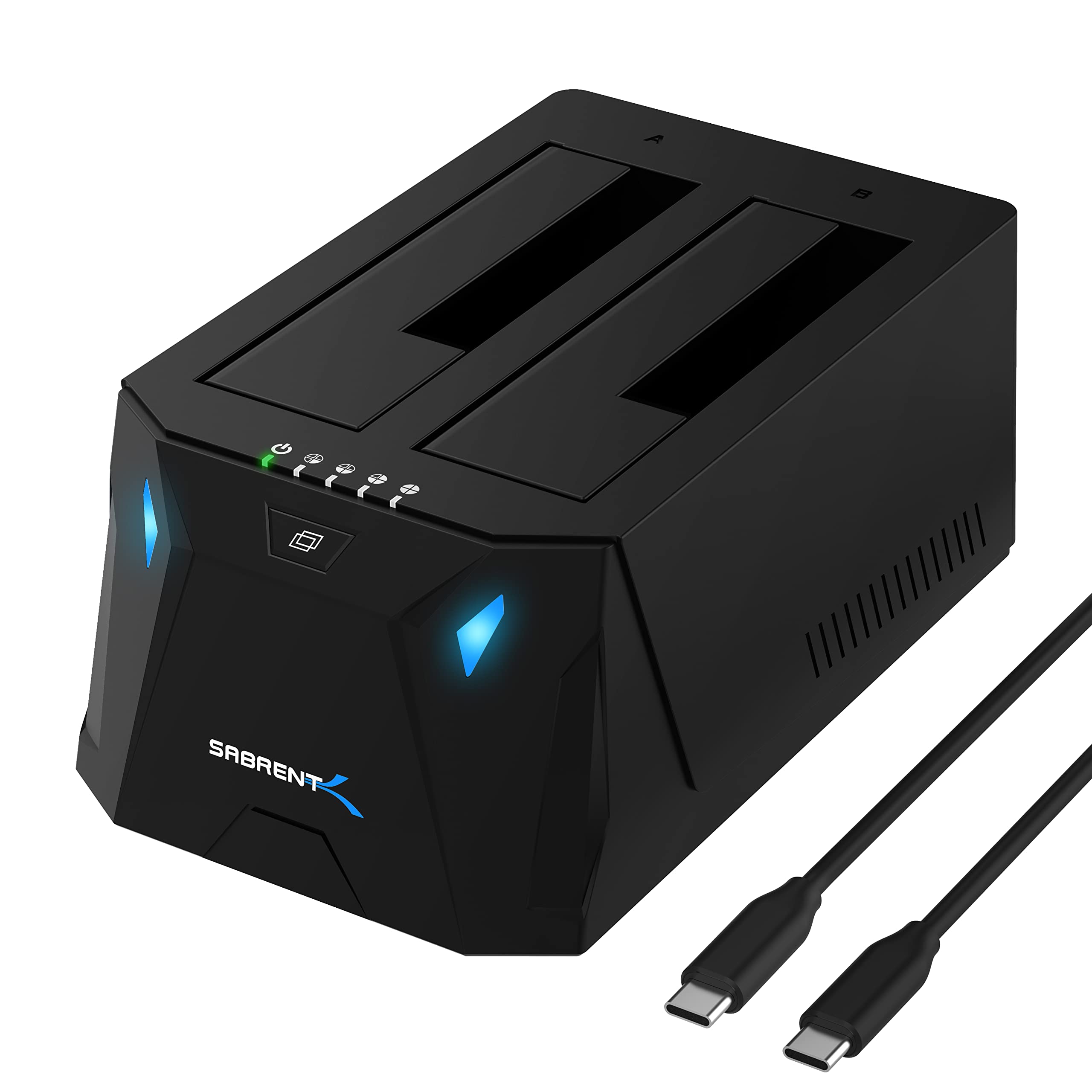
Choose the EC-DFLT for a simpler single-drive setup with USB Type-A host connectivity. The EC-CH2B is a better fit when two-drive access or offline cloning is part of the job, provided its Type-C connection suits your computer.
- The EC-CH2B supports two 2.5- or 3.5-inch SATA drives, allows simultaneous read and write access, and includes offline cloning.
- Its connection is USB Type-C, with transfer speeds up to 5Gbps.
- The EC-DFLT supports one 2.5- or 3.5-inch SATA drive at a time over USB 3.0 and includes a USB Type-A host cable.
Hard Drive Docking Stations alternative
17,000+ ratings
Read Amazon ReviewsSABRENT DS-U3B4 4-Bay USB 3.0 Docking Station
The EC-DFLT is the more focused option when you only need to connect one drive.
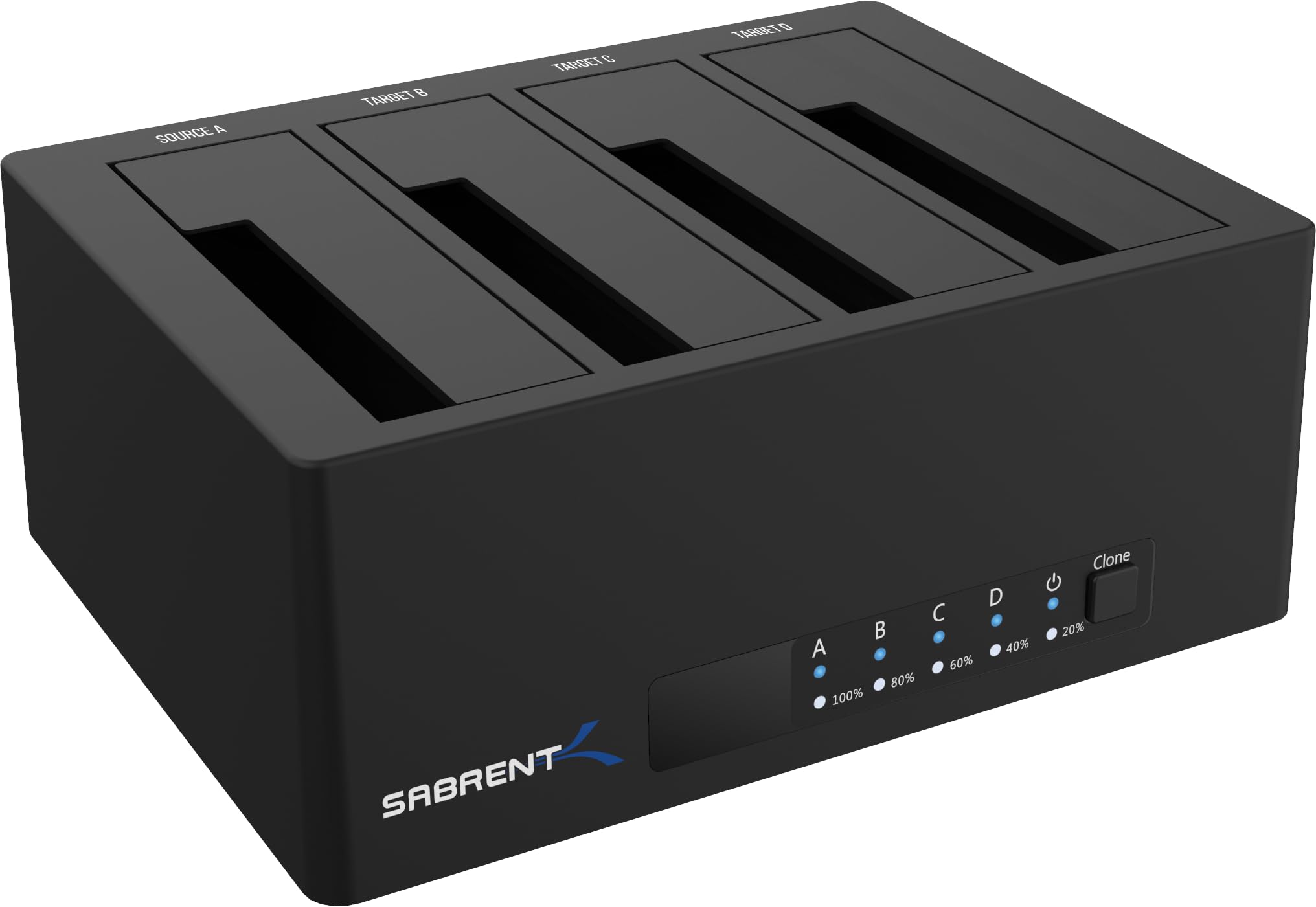
Consider the DS-U3B4 if managing several SATA drives together or cloning directly between drives is more important than keeping the setup compact and simple.
- The DS-U3B4 holds up to four 2.5- or 3.5-inch SATA drives, connects over USB 3.0, and supports offline cloning without a computer.
- The EC-DFLT is a single-drive SATA dock for straightforward access to one drive at a time.
Is SABRENT EC-DFLT Worth It?
The SABRENT EC-DFLT is worth considering as a straightforward dock for accessing 2.5- or 3.5-inch SATA drives.
Its broad operating-system support, included Type-A cable, hot-swappable design, and included adapter cover the basics for a desk-based file transfer or backup workflow.
Buy it if your drive is SATA, you can connect directly to USB 3.0, and the power setup fits your use—especially the wall adapter needed for 3.5-inch HDDs.
Pass if you need M.2 support, multiple drive bays, or S.M.A.R.T. diagnostics through USB.
Your review at a glance
37,000+ ratings
Read Amazon ReviewsSABRENT EC-DFLT SATA Docking Station
A straightforward choice for accessing 2.5- or 3.5-inch SATA drives over USB 3.0, provided you have the right port and power setup.
- Supports 2.5- and 3.5-inch SATA I, SATA II, and SATA III hard drives and SSDs.
- Connects to a computer through USB 3.0 with an included USB Type-A host cable.
- UASP support is available when the host system also supports UASP.
- Plug-and-play use is listed for Windows 10/11, macOS, and Linux; no drivers are required.